File: /home/dnlightw-124/dn.lightweb.kr/node_modules/jarallax/README.md
# Jarallax <!-- omit in toc -->
 
Parallax scrolling for modern browsers. Supported <img> tags, background images, YouTube, Vimeo and Self-Hosted Videos.
## [Online Demo](https://jarallax.nkdev.info/) <!-- omit in toc -->
## Table of Contents <!-- omit in toc -->
- [WordPress Plugin](#wordpress-plugin)
- [Quick Start](#quick-start)
- [Import Jarallax](#import-jarallax)
- [ESM](#esm)
- [ESM CDN](#esm-cdn)
- [UMD](#umd)
- [UMD CDN](#umd-cdn)
- [CJS (Bundlers like Webpack)](#cjs-bundlers-like-webpack)
- [Prepare HTML](#prepare-html)
- [Run Jarallax](#run-jarallax)
- [A. JavaScript way](#a-javascript-way)
- [B. Data attribute way](#b-data-attribute-way)
- [C. jQuery way](#c-jquery-way)
- [Background Video Usage Examples](#background-video-usage-examples)
- [A. JavaScript way](#a-javascript-way-1)
- [B. Data attribute way](#b-data-attribute-way-1)
- [Options](#options)
- [Disable on mobile devices](#disable-on-mobile-devices)
- [Additional options for video extension](#additional-options-for-video-extension)
- [Events](#events)
- [Additional events for video extension](#additional-events-for-video-extension)
- [onScroll event](#onscroll-event)
- [Methods](#methods)
- [Call methods example](#call-methods-example)
- [A. JavaScript way](#a-javascript-way-2)
- [B. jQuery way](#b-jquery-way)
- [For Developers](#for-developers)
- [Real Usage Examples](#real-usage-examples)
- [Credits](#credits)
## WordPress Plugin
[](https://wordpress.org/plugins/advanced-backgrounds/)
We made WordPress plugin to easily add backgrounds for content in your blog with all Jarallax features.
Demo: <https://wpbackgrounds.com/>
Download: <https://wordpress.org/plugins/advanced-backgrounds/>
## Quick Start
There are a set of examples, which you can use as a starting point with Jarallax.
- [ES Modules](examples/es-modules)
- [JavaScript](examples/javascript)
- [Next.js](examples/next)
- [Next.js Advanced Usage](examples/next-advanced)
- [HTML](examples/html)
- [jQuery](examples/jquery)
## Import Jarallax
Use one of the following examples to import jarallax.
### ESM
We provide a version of Jarallax built as ESM (jarallax.esm.js and jarallax.esm.min.js) which allows you to use Jarallax as a module in your browser, if your [targeted browsers support it](https://caniuse.com/es6-module).
```html
<!-- Jarallax CSS -->
<link href="jarallax.min.css" rel="stylesheet">
<!-- Jarallax JS -->
<script type="module">
import { jarallax, jarallaxVideo } from "jarallax.esm.min.js";
// Optional video extension
jarallaxVideo();
</script>
```
### ESM CDN
```html
<!-- Jarallax CSS -->
<link href="https://cdn.jsdelivr.net/npm/jarallax@2/dist/jarallax.min.css" rel="stylesheet">
<!-- Jarallax JS -->
<script type="module">
import { jarallax, jarallaxVideo } from "https://cdn.jsdelivr.net/npm/jarallax@2/+esm";
// Optional video extension
jarallaxVideo();
</script>
```
### UMD
Jarallax may be also used in a traditional way by including script in HTML and using library by accessing `window.jarallax`.
```html
<!-- Jarallax CSS -->
<link href="jarallax.min.css" rel="stylesheet">
<!-- Jarallax JS -->
<script src="jarallax.min.js"></script>
<!-- Jarallax JS: Optional video extension -->
<script src="jarallax-video.min.js"></script>
```
### UMD CDN
```html
<!-- Jarallax CSS -->
<link href="https://cdn.jsdelivr.net/npm/jarallax@2/dist/jarallax.min.css" rel="stylesheet">
<!-- Jarallax JS -->
<script src="https://cdn.jsdelivr.net/npm/jarallax@2/dist/jarallax.min.js"></script>
<!-- Jarallax JS: Optional video extension -->
<script src="https://cdn.jsdelivr.net/npm/jarallax@2/dist/jarallax-video.min.js"></script>
```
### CJS (Bundlers like Webpack)
Install Jarallax as a Node.js module using npm
```
npm install jarallax
```
Import Jarallax by adding this line to your app's entry point (usually `index.js` or `app.js`):
```javascript
import { jarallax, jarallaxVideo } from "jarallax";
import 'jarallax/dist/jarallax.min.css';
// Optional video extension
jarallaxVideo();
```
## Prepare HTML
```html
<!-- Background Image Parallax -->
<div class="jarallax">
<img class="jarallax-img" src="<background_image_url_here>" alt="">
Your content here...
</div>
<!-- Background Image Parallax with <picture> tag -->
<div class="jarallax">
<picture class="jarallax-img">
<source media="..." srcset="<alternative_background_image_url_here>">
<img src="<background_image_url_here>" alt="">
</picture>
Your content here...
</div>
<!-- Alternate: Background Image Parallax -->
<div class="jarallax" style="background-image: url('<background_image_url_here>');">
Your content here...
</div>
```
## Run Jarallax
Note: automatic data-attribute initialization and jQuery integration are available in UMD mode only.
### A. JavaScript way
```javascript
jarallax(document.querySelectorAll('.jarallax'), {
speed: 0.2,
});
```
### B. Data attribute way
```html
<div data-jarallax data-speed="0.2" class="jarallax">
<img class="jarallax-img" src="<background_image_url_here>" alt="">
Your content here...
</div>
```
Note: You can use all available options as data attributes. For example: `data-speed`, `data-img-src`, `data-img-size`, etc...
### C. jQuery way
```javascript
$('.jarallax').jarallax({
speed: 0.2,
});
```
#### No conflict (only if you use jQuery) <!-- omit in toc -->
Sometimes to prevent existing namespace collisions you may call `.noConflict` on the script to revert the value of.
```javascript
const jarallaxPlugin = $.fn.jarallax.noConflict() // return $.fn.jarallax to previously assigned value
$.fn.newJarallax = jarallaxPlugin // give $().newJarallax the Jarallax functionality
```
## Background Video Usage Examples
### A. JavaScript way
```javascript
import { jarallax, jarallaxVideo } from 'jarallax';
jarallaxVideo();
jarallax(document.querySelectorAll('.jarallax'), {
speed: 0.2,
videoSrc: 'https://www.youtube.com/watch?v=ab0TSkLe-E0'
});
```
```html
<div class="jarallax"></div>
```
### B. Data attribute way
```html
<!-- Background YouTube Parallax -->
<div class="jarallax" data-jarallax data-video-src="https://www.youtube.com/watch?v=ab0TSkLe-E0">
Your content here...
</div>
<!-- Background Vimeo Parallax -->
<div class="jarallax" data-jarallax data-video-src="https://vimeo.com/110138539">
Your content here...
</div>
<!-- Background Self-Hosted Video Parallax -->
<div class="jarallax" data-jarallax data-video-src="mp4:./video/local-video.mp4,webm:./video/local-video.webm,ogv:./video/local-video.ogv">
Your content here...
</div>
```
Note: self-hosted videos require 1 video type only, not necessarily using all mp4, webm, and ogv. This is only needed for maximum compatibility with all browsers.
## Options
Options can be passed in data attributes or in object when you initialize jarallax from script.
Name | Type | Default | Description
:--- | :--- | :------ | :----------
type | string | `scroll` | scroll, scale, opacity, scroll-opacity, scale-opacity.
speed | float | `0.5` | Parallax effect speed. Provide numbers from -1.0 to 2.0.
containerClass | string | `jarallax-container` | Container block class attribute.
imgSrc | path | `null` | Image url. By default used image from background.
imgElement | dom / selector | `.jarallax-img` | Image tag that will be used as background.
imgSize | string | `cover` | Image size. If you use `<img>` tag for background, you should add `object-fit` values, else use `background-size` values.
imgPosition | string | `50% 50%` | Image position. If you use `<img>` tag for background, you should add `object-position` values, else use `background-position` values.
imgRepeat | string | `no-repeat` | Image repeat. Supported only `background-position` values.
keepImg | boolean | `false` | Keep `<img>` tag in it's default place after Jarallax inited.
elementInViewport | dom | `null` | Use custom DOM / jQuery element to check if parallax block in viewport. More info here - [Issue 13](https://github.com/nk-o/jarallax/issues/13).
zIndex | number | `-100` | z-index of parallax container.
disableParallax | boolean / RegExp / function | - | Disable parallax on specific user agents (using regular expression) or with function return value. The image will be set on the background.
### Disable on mobile devices
You can disable parallax effect and/or video background on mobile devices using option `disableParallax` and/or `disableVideo`.
Example:
```javascript
jarallax(document.querySelectorAll('.jarallax'), {
disableParallax: /iPad|iPhone|iPod|Android/,
disableVideo: /iPad|iPhone|iPod|Android/
});
```
Or using function. Example:
```javascript
jarallax(document.querySelectorAll('.jarallax'), {
disableParallax: function () {
return /iPad|iPhone|iPod|Android/.test(navigator.userAgent);
},
disableVideo: function () {
return /iPad|iPhone|iPod|Android/.test(navigator.userAgent);
}
});
```
### Additional options for video extension
Required `jarallax/jarallax-video.js` file.
Name | Type | Default | Description
:--- | :--- | :------ | :----------
videoClass | string | `jarallax-video` | Video frame class attribute. Will also contain the type of the video, for example `jarallax-video jarallax-video-youtube`
videoSrc | string | `null` | You can use Youtube, Vimeo or Self-Hosted videos. Also you can use data attribute `data-jarallax-video`.
videoStartTime | float | `0` | Start time in seconds when video will be started (this value will be applied also after loop).
videoEndTime | float | `0` | End time in seconds when video will be ended.
videoLoop | boolean | `true` | Loop video to play infinitely.
videoPlayOnlyVisible | boolean | `true` | Play video only when it is visible on the screen.
videoLazyLoading | boolean | `true` | Preload videos only when it is visible on the screen.
disableVideo | boolean / RegExp / function | - | Disable video load on specific user agents (using regular expression) or with function return value. The image will be set on the background.
## Events
Events used the same way as Options.
Name | Description
:--- | :----------
onScroll | Called when parallax working. Use first argument with calculations. More info [see below](#onscroll-event).
onInit | Called after init end.
onDestroy | Called after destroy.
onCoverImage | Called after cover image.
### Additional events for video extension
Required `jarallax/jarallax-video.js` file.
Name | Description
:--- | :----------
onVideoInsert | Called right after video is inserted in the parallax block. Video can be accessed by `this.$video`
onVideoWorkerInit | Called after VideoWorker script initialized. Available parameter with videoWorkerObject.
### onScroll event
```javascript
jarallax(document.querySelectorAll('.jarallax'), {
onScroll: function(calculations) {
console.log(calculations);
}
});
```
Console Result:
```javascript
{
// parallax section client rect (top, left, width, height)
rect : object,
// see image below for more info
beforeTop : float,
beforeTopEnd : float,
afterTop : float,
beforeBottom : float,
beforeBottomEnd : float,
afterBottom : float,
// percent of visible part of section (from 0 to 1)
visiblePercent : float,
// percent of block position relative to center of viewport from -1 to 1
fromViewportCenter: float
}
```
Calculations example:
[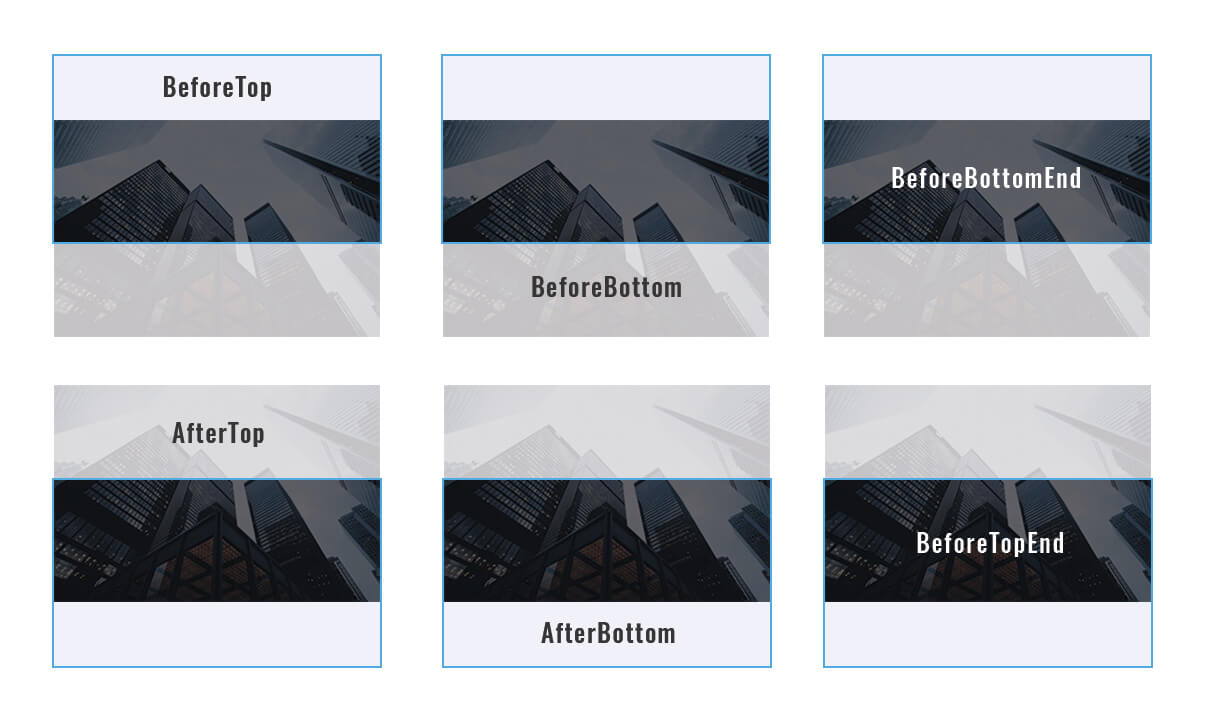](https://a.nkdev.info/jarallax/jarallax-calculations.jpg)
## Methods
Name | Result | Description
:--- | :----- | :----------
destroy | - | Destroy Jarallax and set block as it was before plugin init.
isVisible | boolean | Check if parallax block is in viewport.
onResize | - | Fit image and clip parallax container. Called on window resize and load.
onScroll | - | Calculate parallax image position. Called on window scroll.
### Call methods example
#### A. JavaScript way
```javascript
jarallax(document.querySelectorAll('.jarallax'), 'destroy');
```
#### B. jQuery way
```javascript
$('.jarallax').jarallax('destroy');
```
## For Developers
### Installation <!-- omit in toc -->
* Run `npm install` in the command line
### Building <!-- omit in toc -->
* `npm run dev` to run build and start local server with files watcher
* `npm run build` to run build
### Linting <!-- omit in toc -->
* `npm run js-lint` to show eslint errors
* `npm run js-lint-fix` to automatically fix some of the eslint errors
### Test <!-- omit in toc -->
* `npm run test` to run unit tests
## Real Usage Examples
* [AWB](https://wpbackgrounds.com/)
* [Godlike](https://demo.nkdev.info/#godlike)
* [Youplay](https://demo.nkdev.info/#youplay)
* [Skylith](https://demo.nkdev.info/#skylith)
* [Khaki](https://demo.nkdev.info/#khaki)
## Credits
* Images <https://unsplash.com/>
* Videos <https://videos.pexels.com/>